
Extended Security
Meeting 21 CFR Part 11 requirements has never been easier with the PAX-it! Extended Security Module!
Extended Security Features:
Administrative Tools
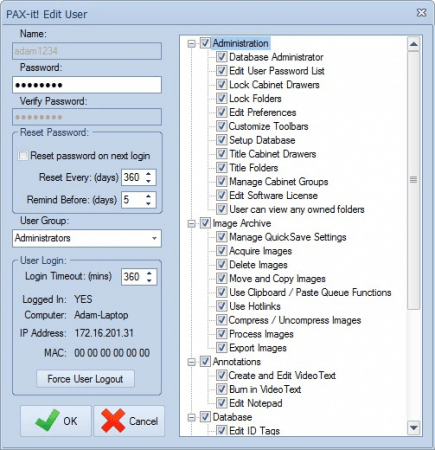
Assign unique logins to users accessing the PAX-it application. Logins may be created within PAX-it itself or sync to Windows Active Directory for a more streamlined approach to user management and authentication. An extended list of PAX-it permissions enables administrators to regulate the actions each user can take—from the assignment of user-owned folders and view-only permissions to limiting access to specific functions like annotating, calibrating and more.
Electronic Records / Electronic Signatures
Easy database storage and digital file management is the hallmark of PAX-it software. The Extended Security module brings this same ease of use to digital signatures—a core requirement for 21 CFR Part 11 compliance, but also an equally useful feature for anyone desiring greater accountability among those working with digital assets. With a button click, digital signatures are applied, locking the image, report, or data so that it may not be modified. Authentication tools are available to verify the integrity of the asset, with built-in warnings to alert customers if any original or signed file has been altered after insertion into PAX-it.
Detailed Audit Trails
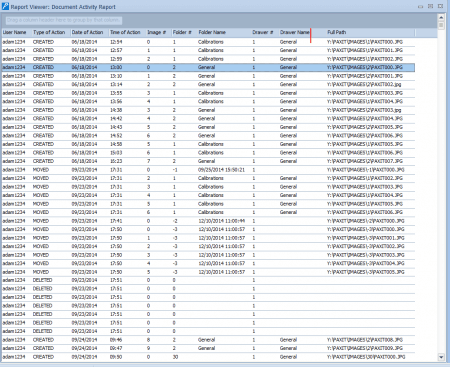
Allows administrators to track activity related to image manipulation, including moving, deleting, adjusting, etc. The creation and modification of other file types (e.g. reports, presentations) are logged. Audit trails are sortable by the image activity, by user activity, by date, and more.
IQ/OQ Services
We also provide on-site IQ/OQ services, complete with documentation. We will travel to you, set up the system and train your team, and provide documentation of the features and capabilities of the software.
In addition to our robust platform, we are happy to offer on-site demonstrations and training, and technical support from our US based offices in Chicago, IL. PAX-it has been crafting custom solutions for Fortune 500 companies in nearly every industry for the past 25 years. Click below to contact us, and let us show you how PAX-it can meet all your digital asset security needs.
[PAX-it] is the best system out in the Metallurgy and Materials Science world I ever used. I had to use another system made overseas when I was at my old company and never liked it. ...All diehard metallurgists like PAX-it!
- Fortune 500 Customer