
Image Annotation Software
PAX-it! Annotation tools
Most image capture is for the purpose of documenting a special occurrence or to show someone else what you have seen. When images are stored in the PAX-it collection, they may be tagged with database field information, and notes may be entered into a searchable notepad attached to each image. In addition, the image itself may be marked up with shapes, arrows, and text in order to point out features or to make notes. The annotation layer is easily edited and added to as necessary, without a need to take the image to another application.
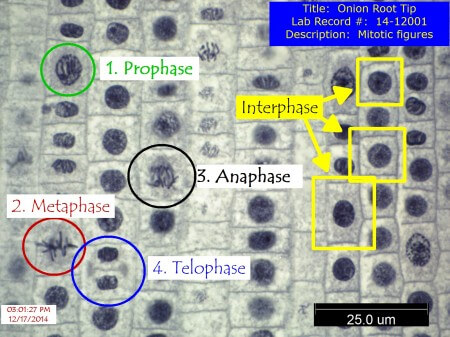
When the time comes to create a report, presentation, email attachment or exported file from an image in PAX-it, the annotation layer may be disregarded, yielding the image itself with no overlay, or the annotations may be flattened onto the image so that they are included.
With the PAX-it Image Annotation Software special annotation templates can be designed, to quickly stamp overlays on images, even automatically at the time of image capture or import. This is a quick and easy way to stamp a company name, micron bar, zone markers, or other created overlays on to images, as an editable starting point or permanent markup. PAX-it database field information may also be transferred right to the image as an editable overlay, as a quick method of identification when sending the image to others.
Annotations for measurements on images also exist, including user-defined scale bars that are positionable on the image, and an optional specialized suite of measurement tools
Besides the ability to draw basic circles, arrows, text, and more, unique aspects of the PAX-it Image Annotation Software are:
- Edit the thickness, color, and position of the markers, even after saving and retrieving a marked-up image
- Undo/redo the drawing and edits, for easy corrections
- Group/Ungroup annotations for ease in movement or editing
- Copy/Paste annotation elements on an image, or between images
- Create templates for stamping annotations onto other images
- Stamp templates automatically as a part of the image saving process
- Date & time stamps may be automatically applied during the image saving process
- Micron bar overlays (scale bars) are easily produced and overlayed on images, and editable for size, color, and position
- Additional specialized annotation tools are present for making measurements on images, where dimensions of the drawn objects are reported
[PAX-it] is the best system out in the Metallurgy and Materials Science world I ever used. I had to use another system made overseas when I was at my old company and never liked it. ...All diehard metallurgists like PAX-it!
- Fortune 500 Customer